guillaumemeyer/watermarks-remover: complete guide to AI watermark inspection and removal
Updated August 21, 2026 · 18 minute read
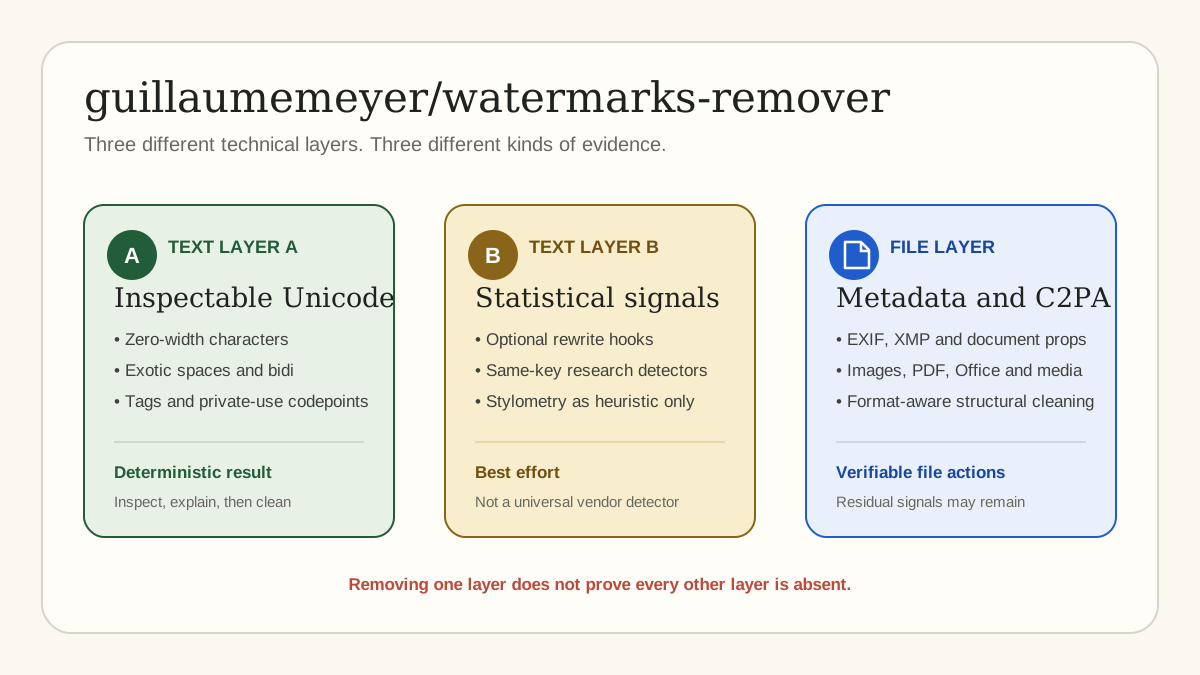
The open-source guillaumemeyer/watermarks-remover repository is not one magic “make AI text undetectable” button. It is a layered privacy and content-hygiene toolkit. It inspects hidden Unicode in text, offers optional rewrite hooks for some statistical watermark scenarios, and processes metadata or provenance surfaces across many file formats.
This guide explains the project in plain language. It covers what every layer does, which methods are deterministic, which methods are best effort, what outside tools are optional, how the HTTP service works, and how Remove AI Text Marks adapts the legitimate inspection and cleaning workflow.
Important: removing inspectable artifacts does not prove human authorship and cannot guarantee that a vendor, school, publisher, or platform detector will fail. The upstream project says the same. Use these tools on content you own or are authorized to process.
Quick answer: what does guillaumemeyer/watermarks-remover do?
The repository groups several different problems under one workflow:
- Text Layer A: find and clean directly observable characters such as detached zero-width marks, exotic spaces, direction controls, Unicode tag characters, private-use codepoints, and other invisible formatting artifacts.
- Text Layer B: optionally rewrite text to disturb statistical token patterns. This is best effort and can change voice or meaning.
- File cleaning: inspect and remove supported C2PA, EXIF, XMP, Office properties, PDF metadata, HTML metadata, Markdown frontmatter, and media container fields.
- Research detectors: optionally test known watermark families when the matching configuration, key, model, tokenizer, or research harness is available.
- Image research backends: optionally score or regenerate images using separate heavy tools. These are not bundled into the core project and do not provide universal guarantees.
- Automation: expose inspection and cleaning through command-line scripts, a local HTTP service, batch endpoints, directory audits, and website audits.
Why this distinction matters
People use “AI watermark” to describe technologies that work in completely different ways.
A zero-width character is physically present in a text string. Software can identify its Unicode codepoint and exact offset. A file metadata field is physically present in a document container. Software can identify the field and remove it. A statistical watermark, by contrast, may be created by changing which tokens a model samples. Detecting that signal can require the original algorithm, secret key, tokenizer, model, and configuration.
Those facts lead to an important rule: an AI watermark remover should state exactly what it observed and exactly what it changed. It should not turn a narrow technical result into an authorship verdict.
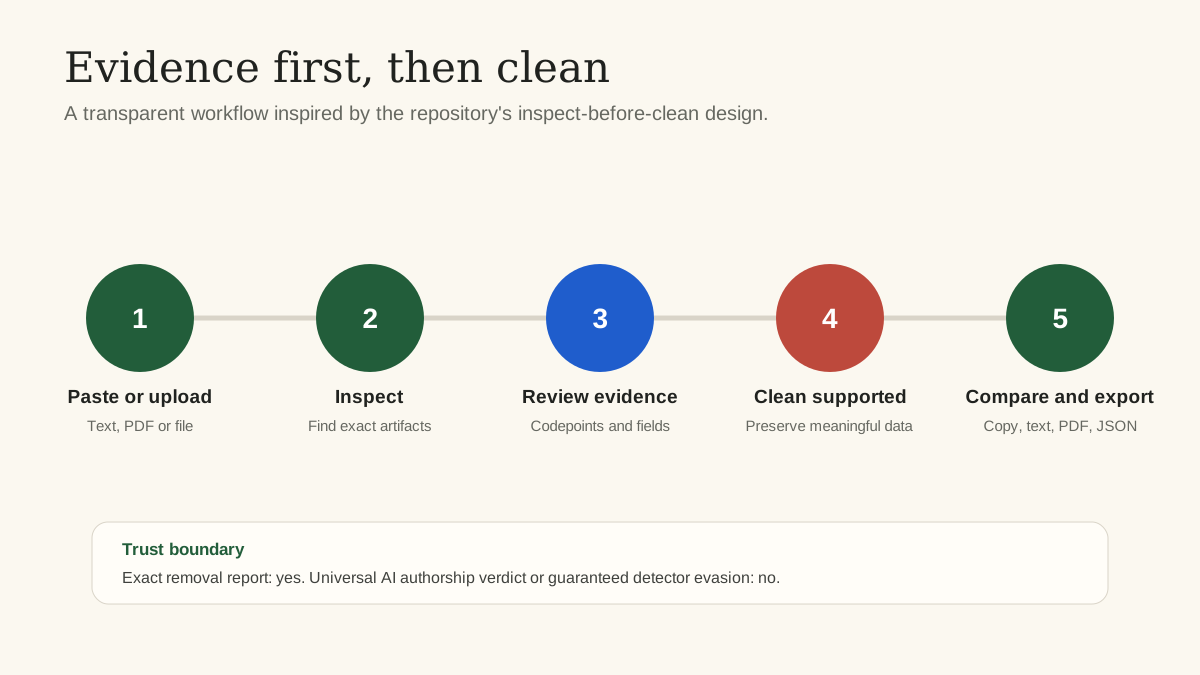
The repository follows an inspect-first pattern. Remove AI Text Marks uses the same product principle: inspect, show evidence, clean supported artifacts, compare the result, then export.
Text Layer A: deterministic hidden Unicode inspection
Layer A is the clearest and most reproducible part of the project. The central implementation is `service/scripts/text_unicode.py`. It walks through text character by character, classifies suspicious codepoints, records counts and offsets, and decides whether each character should be kept, stripped, or replaced.
Characters the inspector looks for
The upstream code contains explicit sets and ranges for several categories:
- U+200B zero-width space and related zero-width characters;
- U+00AD soft hyphen;
- left-to-right and right-to-left marks, embeddings, overrides, and isolates;
- invisible mathematical operators and separators;
- variation selectors, including supplementary variation selectors;
- Unicode tag characters;
- private-use codepoints;
- Unicode noncharacters and reserved default-ignorable ranges;
- Hangul fillers and other blank-looking characters;
- format-control characters in Unicode category `Cf`;
- unusual spaces such as no-break space, thin space, hair space, narrow no-break space, and ideographic space.
The default cleaner removes unsupported invisible characters and normalizes unusual space characters to a regular U+0020 space. Its optional aggressive mode can also map selected Cyrillic and fullwidth lookalikes to Latin characters. Remove AI Text Marks does not enable aggressive lookalike replacement by default because visual similarity is context-sensitive. The Unicode Security Mechanisms report likewise explains that confusability is not an exact science.
Exact evidence, not a guess
For each finding, a useful report can show:
- Unicode codepoint;
- official or readable character name;
- artifact category;
- number of occurrences;
- character offsets;
- confidence label;
- proposed action;
- reason for the action.
That is why hidden Unicode inspection is different from a generic AI text detector. A user can reproduce a U+200B finding with another Unicode-aware tool. The evidence exists in the supplied text.
Context-aware preservation: why the tool does not delete every invisible character
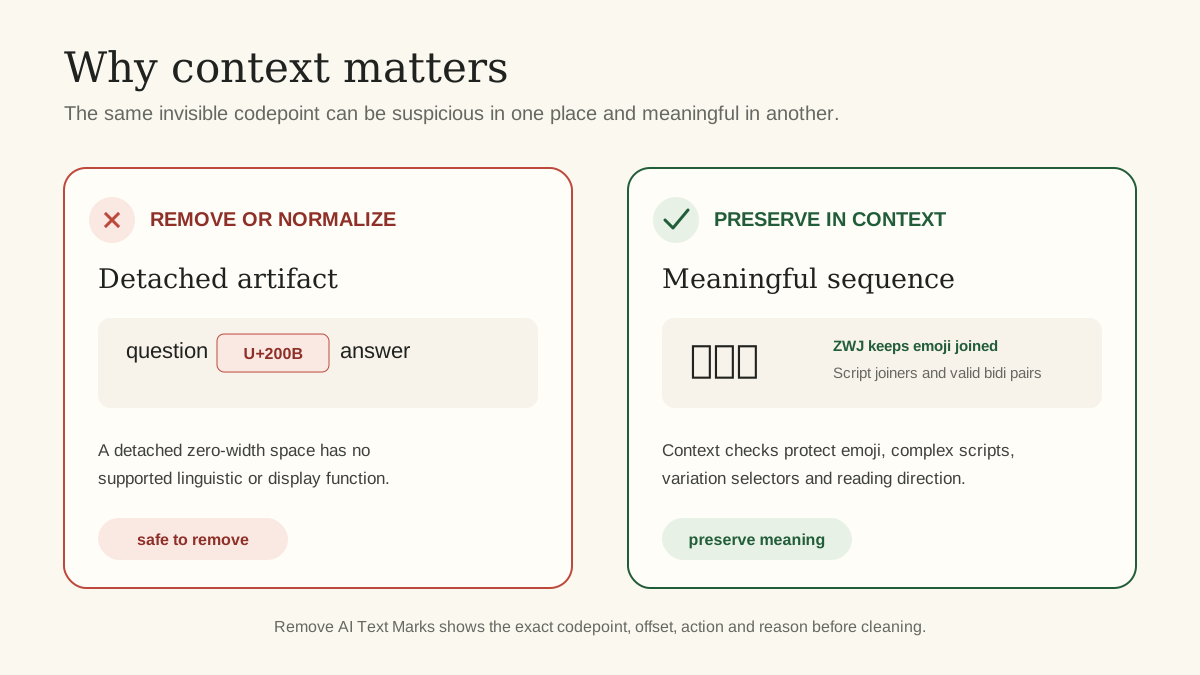
A naive hidden-character remover can damage legitimate writing. Some invisible characters are necessary for emoji, Arabic, Persian, Indic scripts, Mongolian text, Korean Jamo sequences, bidirectional reading order, musical notation, or Egyptian hieroglyph layout.
The upstream method therefore examines neighboring characters and complete sequences before cleaning.
Emoji protection
U+200D is the zero-width joiner. Detached from meaningful context, it can be a hidden carrier. Inside an emoji sequence, it joins multiple emoji into one visible symbol. The method preserves a joiner when its surrounding characters form a supported emoji sequence. It also preserves emoji presentation selectors when they follow an emoji-capable base.
Complex-script protection
Zero-width joiners and non-joiners can affect how letters connect in Persian and other scripts. The cleaner checks whether both neighboring characters belong to a compatible joining script before preserving the control.
The same principle applies to Mongolian variation selectors, Khmer inherent vowels, Hangul fillers, and certain orthographic controls used in Arabic or Syriac text.
Direction control protection
Bidirectional controls can be abused to reorder displayed text, but they can also support legitimate right-to-left and mixed-direction writing. The upstream default cleaning preserves selected directional marks and valid paired embeddings. Overrides and malformed or unsupported contexts receive stricter treatment.
Flag tag protection
Unicode tag characters can carry hidden data. They are also used in some valid subdivision flag emoji sequences. The method recognizes complete flag sequences and preserves their load-bearing tags while treating detached tags as suspicious.
This context-aware behavior is the most important difference between a safe text watermark remover and a destructive “delete every invisible character” regex.
Inspection and cleaning are separate operations
The repository provides separate scripts for inspection and cleaning:
- `inspect_text.py` reports findings without changing the input.
- `clean_text.py` produces a cleaned copy and can return statistics.
- `inspect_file.py` routes a supported file to the correct inspector.
- `clean_file.py` routes a supported file to the correct cleaner.
The current project also refuses to treat obvious binary containers as ordinary text. That safety check prevents a DOCX, PDF, or image from being decoded as random characters and then overwritten with corrupted bytes. Unknown formats are reported as unknown and are not automatically cleaned.
That approach is production-friendly: classify first, inspect second, clean only with a known handler, and write a new output rather than silently destroying the original.
Text Layer B: statistical watermark rewriting
Some text watermarks are not hidden characters. A generation system can bias token selection according to a secret or configured rule. The visible words may look ordinary while their token distribution carries a statistical signal.
The repository labels this Layer B. Its `rewrite_text.py` hook can ask an agent, local Ollama model, or OpenAI-compatible endpoint to rewrite a passage. Rewriting changes the token sequence, which may weaken some statistical signals.
This is fundamentally different from Layer A:
- Layer A identifies exact characters and makes deterministic edits.
- Layer B generates new wording.
- Layer A can preserve the original words.
- Layer B can change tone, citations, nuance, factual precision, and meaning.
- Layer A results are directly inspectable.
- Layer B verification depends on an available detector or a weaker similarity metric.
Detection-guided rewriting
The current upstream workflow can generate multiple rewrite candidates and evaluate each attempt. When a compatible detector is configured, it can stop after a candidate passes that detector. Without a detector, it can compare lexical divergence and return a best-effort candidate.
Passing one configured detector does not prove that every detector will fail. A same-configuration research harness is evidence about that configuration only.
MarkLLM research harness
The optional MarkLLM integration supports controlled tests for schemes such as green-list and SynthID-class research configurations. It is useful when the test text was created with the same known scheme configuration.
It is not a universal ChatGPT, Claude, Gemini, or Grok oracle. Arbitrary vendor text may use no watermark, a different watermark, an undisclosed key, or a detector unavailable to the public.
Keyed-Gumbel or EXP verification
The repository also includes a standard-library detector for a keyed-Gumbel family. Exact replay needs the same key and tokenization used during generation. Word-based text mode is useful for quick experiments, while exact engine verification requires the original token IDs.
This demonstrates why “AI text watermark detector” is not one universal category. Detection can be scheme-specific and key-specific.
Stylometry is heuristic
The repository includes writing-pattern metrics in `score_stylometry.py`. Metrics can describe sentence lengths, vocabulary repetition, punctuation, connective phrases, list patterns, and other features.
Stylometry cannot prove AI authorship. Human writers and AI systems can share the same patterns. Short texts provide especially weak evidence. Remove AI Text Marks keeps these observations in a separate low-confidence section and never combines them into a definitive author label.
File metadata and provenance cleaning
The file layer works on containers and metadata rather than only visible prose. The upstream README lists support across text, document, image, audio, video, and archive-based formats.
Documents and structured text
Supported document surfaces include DOCX, XLSX, PPTX, ODT, EPUB, HTML, Markdown, and plain text. Depending on format, the cleaner can inspect or remove:
- Office core and custom document properties;
- application and generator metadata;
- custom XML parts associated with metadata;
- HTML `meta` fields and provenance-like attributes;
- Markdown frontmatter keys;
- embedded media metadata in supported containers;
- inspectable Unicode artifacts in appropriate visible text parts.
The method avoids scanning arbitrary compressed bytes as if they were visible text. For DOCX, for example, later upstream fixes focus metadata inspection on property and custom XML areas rather than treating the visible document body as suspicious metadata.
Images
The core file pipeline covers many common raster and vector formats, including PNG, JPEG, WebP, AVIF, HEIC, BMP, GIF, TIFF, and SVG. Depending on the format, it can process EXIF, XMP, GPS, comments, software tags, ICC profiles, C2PA-related boxes, or SVG metadata blocks.
Metadata cleaning is not the same as pixel watermark removal. If a signal is embedded in pixel values, deleting EXIF or XMP does not remove it.
Audio and video
The repository recognizes metadata in MP4, MOV, M4A, M4V, WAV, and MP3. Examples include ISO base media boxes, user-data generator tags, RIFF information chunks, embedded ID3 chunks, and MP3 ID3 frames.
C2PA and Content Credentials
C2PA defines cryptographically bound provenance manifests, commonly called Content Credentials. The C2PA specification describes claims, assertions, signatures, manifest stores, and content bindings.
The repository can inspect and strip supported hard-bound manifest data in listed file formats. That does not create a truthful replacement credential. It also does not guarantee removal of soft bindings or separate in-content watermark channels that may reconnect an asset to remote provenance data.
Why PDF cleaning needs structural rewriting
The upstream README makes a useful PDF distinction. ExifTool can update a PDF incrementally, so old metadata bytes may remain recoverable inside the file even when a viewer stops displaying them. The project follows metadata removal with `qpdf --linearize` when qpdf is available. That rebuilds the PDF object graph and drops unreferenced objects.
Without qpdf, the operation can still hide fields from normal viewers, but the report warns that original bytes may remain. This is exactly the kind of residual-risk disclosure a metadata remover should provide.
Optional image watermark research backends
The repository documents heavier external components for image research. They are separate from the core standard-library service.
Reverse-SynthID scoring
An optional external reverse-SynthID checkout can provide a local pixel-domain confidence score. The upstream documentation treats this as scoring, not removal. It also notes separate license restrictions and does not bundle the external code into the published core service.
CtrlRegen
The optional CtrlRegen path regenerates an image while trying to preserve content. The project uses a conservative default strength because stronger regeneration can alter more visual detail. Large images are tiled by the external backend. This is compute-heavy and may require a GPU.
The external implementation is not bundled, and the upstream repository explicitly avoids presenting it as a guarantee.
MarkDiffusion
The optional MarkDiffusion harness supports controlled watermark experiments and a diffusion-purification path. Same-scheme tests can compare a known watermarked image before and after processing. They cannot certify that an unknown vendor detector will fail on an arbitrary image.
HTTP service and automation
The project includes a Python 3.10 or newer HTTP service built largely with the standard library. Its documented endpoints include:
- `GET /health` for status and version;
- `GET /capabilities` for available tools and detectors;
- `GET /openapi.json` for the API contract;
- `POST /inspect` for one file;
- `POST /detect` for configured detectors;
- `POST /clean` for one file;
- `POST /inspect/batch` for multiple inspections;
- `POST /clean/batch` for multiple cleaning operations.
Files are sent as base64 data with a filename so the service can route by extension and magic bytes. Batch operations report errors per item instead of aborting the whole collection.
The service binds to loopback by default. It can require a bearer key. Remote rewriting is disabled unless explicitly allowed, and rewrite API keys are read from environment variables instead of command-line arguments.
The repository also includes directory and website audit scripts. Website auditing needs careful network controls because a crawler can otherwise be abused to access private services. Upstream hardening includes same-site limits and defenses against server-side request forgery and compressed-response bombs.
How Remove AI Text Marks uses the method
Remove AI Text Marks adapts the deterministic, context-aware Layer A method into browser JavaScript. The audited integration is pinned to upstream commit `d5563d2e129166cae737cc6ac604e75f5631c368` for reproducibility.
The browser scanner provides:
- hidden Unicode and unusual-space inspection;
- exact codepoints, offsets, counts, actions, and explanations;
- context-aware preservation for meaningful emoji, scripts, variation selectors, direction controls, and flag sequences;
- structured Markdown and HTML metadata inspection;
- a transparent original and clean-result comparison;
- downloadable text, PDF, JSON, CSV, and audit reports;
- no sign-up and local processing for pasted text.
The server-side file tools use the pinned upstream service for supported document, PDF, image, audio, video, batch, and website workflows when the application is deployed with its Docker setup.
Remove AI Text Marks does not expose the optional Layer B rewrite engine or claim generic vendor-level text watermark removal. It also does not bundle the external GPU-heavy pixel-removal research projects. These boundaries prevent a deterministic artifact cleaner from being misrepresented as an undetectability service.
How to use Remove AI Text Marks for the same inspect-first workflow
- [Open the free text watermark scanner](/).
- Paste text or upload a supported text or PDF file.
- Select Scan text and wait for the evidence report.
- Review highlighted positions and the change summary.
- Select Clean supported artifacts only after reviewing the proposed actions.
- Compare the original with the clean result.
- Copy the result or download text, PDF, JSON, CSV, or a readable audit report.
For binary formats, choose the focused tool:
- Free document metadata remover
- Free PDF metadata remover
- Free image metadata remover
- Free video and audio metadata remover
- Free batch metadata cleaner
- Free website watermark audit
Can this make AI text undetectable or human-written?
No honest tool can guarantee that result for arbitrary text.
Removing U+200B proves that U+200B is gone. Normalizing a narrow no-break space proves that character was replaced. Removing a document property proves that field was removed from the output produced by the supported cleaner. None of those actions changes who wrote the original passage.
A statistical rewrite can alter token patterns, but it may also change meaning and still be detected by another system. A detector score can vary with passage length, language, editing, model family, and configuration. A low score is not proof of human authorship.
Use Remove AI Text Marks to create a clean, reviewable copy without unsupported hidden artifacts. Do not use it to make false authorship claims, evade required disclosure, or violate academic and workplace rules.
License and attribution
The core guillaumemeyer/watermarks-remover license is MIT. The license permits use, modification, distribution, and commercial use when the copyright and permission notice are included with substantial copies.
Remove AI Text Marks preserves attribution in its adapted source headers, `NOTICE.md`, and the complete upstream license file. The production Docker image checks out a pinned upstream commit so the deployed behavior is reviewable and reproducible.
Optional external research projects can have different licenses. The upstream README specifically separates bundled core code from external checkouts and local-only images. Anyone deploying those optional components should review each upstream license and model license independently.
Frequently asked questions
Is guillaumemeyer/watermarks-remover an AI detector?
It is primarily a layered inspection and cleaning toolkit. Some optional research detectors exist, but the project does not offer a universal authorship detector.
Does it remove ChatGPT or Claude watermarks?
It can remove inspectable Unicode or file metadata artifacts regardless of which editor or generator preceded them. That does not prove the artifact came from ChatGPT or Claude. Undisclosed statistical marks need compatible detectors and cannot be universally verified by a generic cleaner.
Does Layer A need an API key?
No. The deterministic Unicode scripts use Python standard-library functionality, and Remove AI Text Marks runs its adapted pasted-text method locally in the browser.
Do the file tools need an AI API?
No AI API is required for the core file metadata workflow. Some formats benefit from system tools such as ExifTool, qpdf, or c2patool. Optional statistical rewriting or heavy research scoring can require a model endpoint, local model, key, GPU, or external checkout.
Why not remove every invisible character?
Because some invisible controls preserve emoji appearance, word shaping, language meaning, or reading direction. Context-aware cleaning reduces false positives and visible damage.
Can C2PA removal make a file authentic?
No. Removing provenance data does not create valid provenance and does not prove authentic origin. A cleaned file should not be presented as having a history it does not have.
What does “clean result” mean in Remove AI Text Marks?
It means the supported deterministic removals and normalizations shown in the report were applied. It does not mean all possible statistical, cryptographic, semantic, pixel-level, or vendor-private signals are absent.
Primary sources and further reading
- guillaumemeyer/watermarks-remover repository
- Upstream README and coverage matrix
- Context-aware Unicode implementation
- Format routing implementation
- Container metadata implementation
- HTTP service implementation
- Upstream MIT license
- Unicode Technical Standard 39: security mechanisms
- C2PA technical specifications
- Remove AI Text Marks methodology and limits